


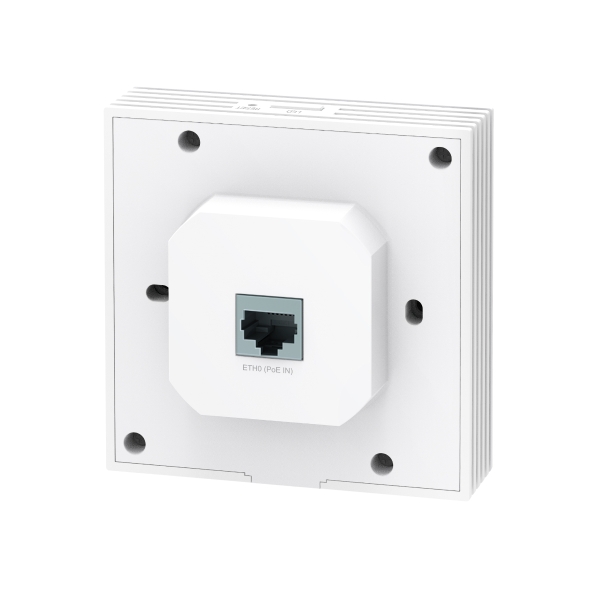
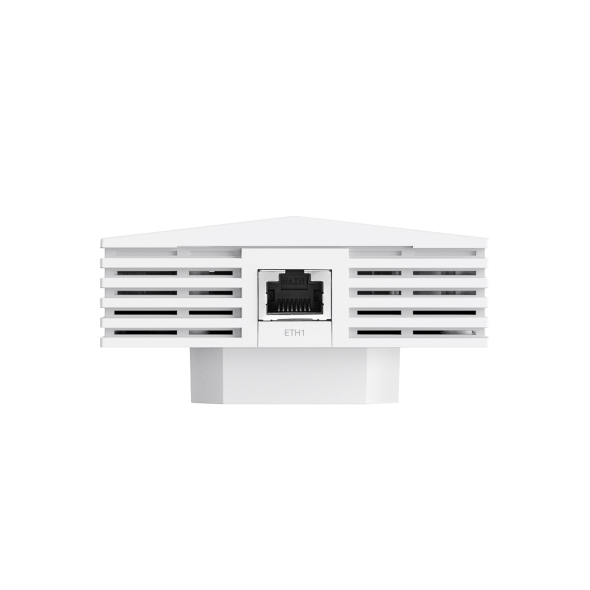


AX3000 Access Point WiFi 6 Gắn Tường
- Tốc độ Wi-Fi 6 lên đến 2976 Mbps: 574 Mbps trên băng tần 2.4 GHz và 2402 Mbps trên băng tần 5 GHz.†
- Phủ sóng Wi-Fi toàn diện trong từng phòng, mang đến kết nối liền mạch.
- Kết nối các thiết bị có dây thông qua 1 cổng downlink Gigabit.
- Tích hợp với nền tảng Omada SDN, hỗ trợ quản lý tập trung.
- Thiết kế dễ lắp đặt và hỗ trợ PoE, giúp triển khai nhanh chóng, thuận tiện.
Match Your Room with
AX3000 WiFi 6
AX3000 Wall Plate WiFi 6 Access Point
 EAP650-Wall
-
AX3000 WiFi 6 Speed
2402 Mbps on 5 GHz + 574 Mbps on 2.4 GHz†
-
High-Efficiency WiFi 6
More connected devices enjoy faster speeds
-
Centralized Cloud Management
Manage the whole network locally or from the cloud
-
160 MHz Channel
Double the data at peak transmission times on a
single stream with HE160‡ -
Enhanced Security
With guest networks, Captive Portal, and WPA3 encryption
-
Seamless Roaming
Uninterrupted streaming when moving between APs§
-
Two Gigabit Ports
One downlink and one uplink for fast wired connection
-
802.3af PoE Support
Flexible and convenient deployment
-
Quick, Simplified Installation
Compatible with 86 mm & EU standard junction box
Dedicated Complete,
Private WiFi Network in Each Room
-
Hospitality
Room-by-room connection with elegant appearance
-
Dormitory
Stable wireless and wired connections
-
Apartment
Private and secure network access for every family
-
Villa
Whole-home WiFi coverage with seamless roaming
-
Meeting Room
Faster streaming, downloading, video conferencing, and everything to satisfy your needs
Lightning-Fast AX3000 WiFi 6 Speeds
WiFi 6 brings faster speeds, lower lag, less interference, and higher capacity. Enjoy more than twice the speed of WiFi 5 with new-era business WiFi 6 with speeds up to 2976 Mbps.†
-
1024 QAM
25% more data encoded at one time
-
Long OFDM Symbol
11% faster speed
-
HE160
Double the data at peak transmission times on a single stream‡
Better User Experience with High-Performance
WiFi 6 Connectivity
The latest WiFi 6 features and advanced wireless techniques guarantee higher network efficiency and lower latency. ‡
-
OFDMA
-
BSS Coloring
-
High-Efficiency
WiFi 6 -
Band
Steering
More than Speed, Security Matters
Safeguard your network against brute force attack and snooping with WPA3 enterprise-grade security protection, portal authentication, and segregated guest networks.
-
Secure Guest Network with Up to 16 SSIDs
Guest networks provide enhanced security. Different SSIDs also enable flexible access management.
-
Boost Business with Voucher and SMS Login
Captive portals (including SMS and Voucher) and 802.1x authentication ensure authorized guests can access the network. Boost your business with a customized marketing page.§
-
WPA3 for Worry-Free Open Public Networks
WPA3 provides more data security for previously unsecured and open WiFi hotspots with advanced enterprise security.
Gigabit Ports to Bridge Network
The gigabit downlink port allows to connect wired device to the gigabit network.
- Switch
- Printer
- PC
- Smart TV
PoE Input
Effortless Deployment with PoE Powered
With 802.3af PoE support, there’s no need for more wiring. Plug it into the existing Ethernet cables, and you’re ready.
TP-Link PoE Switch
Ethernet Cable
Quick, Simplified Installation
With an easy-to-install design, there is no need to bring someone in to install our EAP.
*Fits two kinds of wall junctions
-
86 mm wall junction box
-
Standard EU wall junction box
Auto Channel Selection and Power Adjustment to Optimize Overall Performance*
Provides powerful wireless performance while significantly reducing WiFi interference by automatically adjusting the channel settings and transmission power levels of neighboring APs in the same network
-
Before Optimization
 Channel 1Channel 1Channel 4
 -
After Optimization
 Channel 1Channel 11Channel 6
Seamless Integration into Omada SDN
The Omada Software Defined Networking (SDN) platform integrates network devices including access points, switches, and routers to provide 100% centralized cloud management and create a highly scalable network—all controlled from a single interface.
-
Hardware, Software, or Cloud-Based Controllers
-
Centralized Cloud Management
-
Intelligent Monitoring
-
Zero-Touch Provisioning (ZTP)*
Internet
Cloud Access
WiFi 6 Wall Plate AP
EAP650-Wall
Ceiling Mount AP
Outdoor AP
JetStream PoE Switches
Omada VPN Router
Web Browser
Omada App
Omada Hardware Controller
Or
Omada Software Controller
Easy Management with the Omada App
Follow configuration instructions on the Omada app to get set up in minutes. Omada lets you configure settings, monitor the network status, and manage clients, all from the convenience of your mobile device.


| TÍNH NĂNG PHẦN CỨNG | |
|---|---|
| Giao diện | • Uplink: 1× 10/100/1000 Mbps Ethernet Port• Downlink: 1× 10/100/1000 Mbps Ethernet Port |
| Khóa bảo mật vật lý | No |
| Nút | Reset, LED |
| Bộ cấp nguồn | 802.3af PoE |
| Điện năng tiêu thụ | EU: 10.5 W |
| Kích thước ( R x D x C ) | 86 × 86 × 42.2 mm (3.4 × 3.4 × 1.7 in) |
| Ăng ten | 2 Dual-Band Antennas• 2.4 GHz: 2× 3 dBi• 5 GHz: 3× 5 dBi |
| Lắp | Wall Plate Mounting (Kits included) |
| QUẢN LÝ | |
|---|---|
| Omada App | Yes |
| Centralized Management | • Omada Hardware Controller (OC300)• Omada Hardware Controller (OC200)• Omada Software Controller• Omada Cloud-Based Controller |
| Cloud Access | Yes. Requiring the use of OC300, OC200, Omada Cloud-Based Controller, or Omada Software Controller. |
| Email Alerts | Yes |
| LED ON/OFF Control | Yes |
| Quản lý kiểm soát truy cập MAC | Yes |
| SNMP | v1, v2c, v3 |
| System Logging Local/Remote Syslog | Local/Remote Syslog |
| SSH | Yes |
| Quản lý dựa trên Web | HTTP/HTTPS |
| Quản lý L3 | Yes |
| Quản lý nhiều trang Web | Yes |
| Quản lý VLAN | Yes |
| Zero-Touch Provisioning | Yes. Requiring the use of Omada Cloud-Based Controller. |
| TÍNH NĂNG WI-FI | |
|---|---|
| Coverage | 40㎡(450ft²)*** |
| Concurrent Clients | 100+** |
| Chuẩn Wi-Fi | IEEE 802.11ax/ac/n/g/b/a |
| Băng tần | 2.4 GHz and 5 GHz |
| Tốc độ tín hiệu | • 5 GHz: Up to 2402 Mbps• 2.4 GHz: Up to 574 Mbps |
| Tính năng Wi-Fi | • 16 SSIDs (Up to 8 SSIDs on each band)• Enable/Disable Wireless Radio• Automatic Channel Assignment• Transmit Power Control (Adjust Transmit Power on dBm)• QoS(WMM)• Omada Mesh§• Seamless Roaming(802.11k/v/r)§• Beamforming• Rate Limit• Load Balance• Airtime Fairness• Band Steering• Reboot Schedule• Wireless Schedule• RADIUS Accounting• MAC Authentication• Wireless Statistics• Static IP/Dynamic IP |
| Bảo mật Wi-Fi | • Captive Portal Authentication§• Access Control• Wireless Mac Address Filtering• Wireless Isolation Between Clients• VLAN• Rogue AP Detection• 802.1X Support• WPA-Personal/Enterprise, WPA2-Personal/Enterprise, WPA3-Personal/Enterprise |
| Công suất truyền tải | • CE: <20 dBm (2.4GHz, EIRP)<23 dBm (5GHz, EIRP ) |
| KHÁC | |
|---|---|
| Chứng chỉ | CE |
| Sản phẩm bao gồm | • AX3000 Wall Plate WiFi 6 Access Point EAP650-Wall• Installation Guide• Mounting Kits |
| System Requirements | Microsoft Windows XP, Vista, Windows 7, Windows 8, Windows10, Windows 11, Linux |
| Môi trường | • Operating Temperature: 0–40 ℃ (32–104 ℉)• Storage Temperature: -40–70 ℃ (-40–158 ℉)• Operating Humidity: 10–90% RH non-condensing• Storage Humidity: 5–90% RH non-condensing |
†Tốc độ tín hiệu không dây tối đa là tốc độ vật lý được xác định theo tiêu chuẩn IEEE 802.11. Tốc độ truyền dữ liệu và vùng phủ sóng không dây thực tế không được đảm bảo và có thể thay đổi do: (1) các yếu tố môi trường, bao gồm vật liệu xây dựng, vật cản và chướng ngại vật; (2) điều kiện mạng, bao gồm nhiễu cục bộ, lưu lượng và mật độ truy cập, vị trí lắp đặt sản phẩm, độ phức tạp của mạng và chi phí xử lý của hệ thống; và (3) giới hạn của thiết bị đầu cuối, bao gồm hiệu năng, vị trí, chất lượng kết nối và tình trạng của thiết bị.
**Dung lượng thực tế phụ thuộc vào môi trường không dây và lưu lượng của các thiết bị kết nối, do đó thường thấp hơn số lượng kết nối tối đa được công bố.
‡Việc sử dụng WiFi 6 (802.11ax) và các tính năng của chuẩn này, bao gồm OFDMA và 1024-QAM, yêu cầu thiết bị đầu cuối phải hỗ trợ các tính năng tương ứng.
§Các tính năng Omada Mesh, Seamless Roaming và Captive Portal yêu cầu sử dụng bộ điều khiển Omada SDN. Truy cập https://www.tp-link.com/en/omada-mesh/product-list/ để xem danh sách các mẫu thiết bị hỗ trợ công nghệ Omada Mesh, đồng thời tham khảo Hướng dẫn sử dụng của bộ điều khiển Omada SDN để biết phương pháp cấu hình.
*Các tính năng Zero-Touch Provisioning, Auto Channel Selection và Power Adjustment yêu cầu sử dụng Omada Cloud-Based Controller. Truy cập https://www.tp-link.com/en/omada-cloud-based-controller/product-list/ để xác nhận các mẫu thiết bị tương thích với Omada Cloud-Based Controller.
***Giá trị vùng phủ sóng được tính toán dựa trên các thử nghiệm trong phòng thí nghiệm. Vùng phủ sóng thực tế không được đảm bảo và có thể thay đổi tùy thuộc vào khả năng của thiết bị đầu cuối và các yếu tố môi trường.